Table of Contents
Your first useful goal
Complete the starter exam and receive Class D, then get a car you can use for paid driving work. The important early loop is test, license, car and job. Cash then funds your next exam and vehicle purchase.
Join the exact Roblox experience by Like & Join For Bonus Car. Several Roblox games use similar driving-license names, so use the official Play link on this site to reach Place 91652462379782.
A practical first-session order
- Follow the instructor through the four starter stations. Read the current instruction before moving to the next marked area.
- After the pass message, check that the license panel shows Class D.
- Go to the D Classics row and inspect an available car. The class requirement and purchase price are shown at the vehicle.
- Choose an affordable vehicle, then take a job from the job board. Follow its pickup and drop-off instructions.
- Keep enough cash for the next test before spending on another car or cosmetic changes.
- Return to the test centre when the next-license panel shows that you can afford its fee.
Use the license panel to choose your next goal
The progression display separates your next car from your next license. A full cash target does not itself mean you own the vehicle or hold the license. Complete the purchase or exam, and follow any collection prompt afterwards.
Use the license guide for class requirements, the first-test walkthrough for the training area, and the Class C walkthrough for the first town-drive example. The official badge descriptions confirm later classes, but this guide does not invent their full routes.
Read the controls shown on your device
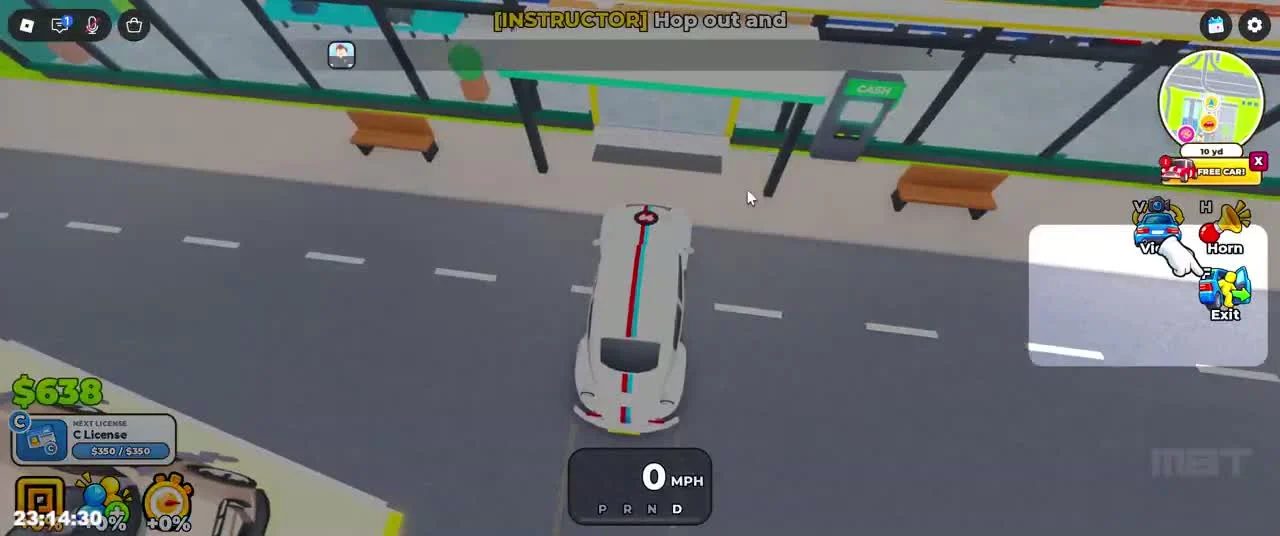
The reviewed PC recording labels V for View, H for Horn and F for Exit once the player is in a vehicle. Interaction prompts use E in that recording. The game advertises support for all devices; mobile and controller button mappings have not been independently verified.
If progress seems stuck
- Look for an incomplete station, active job or test clipboard before buying anything else.
- If a car says it needs a class, return to the relevant license objective. Having enough cash alone does not remove the requirement.
- After a completed test, read the collection instruction and return to reception if prompted.
- Use the current game prompts when they differ from the older recording.
Related Guides
How to Pass the First Driving Test: Class D
Follow all four starter stations: cones, figure eight, STOP box and parking, with reviewed gameplay screenshots.
Read guide →License Classes, Test Fees and Unlocks
Compare Class D, C, B, A and S, then understand the separate Master License and collection goals.
Read guide →